
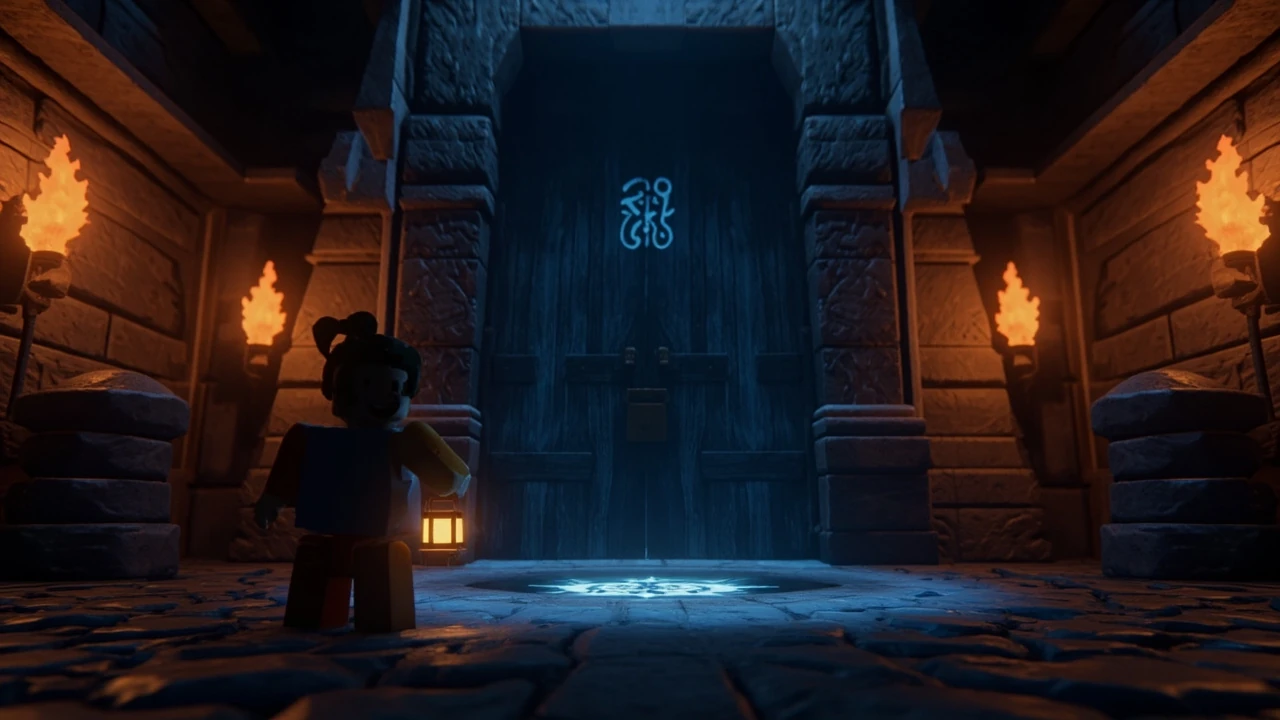
Blue Gate locked gate event: what actually blocks the door
The Blue Gate locked gate event is the sealed-door sequence in Roblox’s Blue Gate experience that stops most players the first time they reach the rear courtyard. The gate looks like a simple barrier, but the event layer behind it is what decides whether the door opens, whether a key item is consumed, and whether the surrounding NPCs react. When players say the gate is stuck, they are usually describing one of three things: the visible padlock does not respond to interaction, the in-game quest tracker says the requirement is not met, or the door opens visually but does not teleport or unlock the next area. Treating those as the same bug is the most common reason a run gets wasted, because each symptom points to a different point in the server script.
The locked gate sits between the safe courtyard and the path that leads to the cellar area used in the follow-up quest. The door is a normal Roblox TouchInterest part at runtime, but the event around it runs through a server-side script that checks several flags before it lets the client animate the door open. That split is why some exploits or duplicated local saves still fail the check: the server only cares about the flag values it stored, not what the client thinks it should be able to do. If you are playing on a poor mobile connection, the same split is also why the door sometimes swings and then snaps back; the client animation finished, but the server confirmation never arrived.
Before you touch the gate, it helps to know which Blue Gate the event refers to. There is a single canonical Blue Gate map used by the main Roblox experience, and the locked gate event is the same script instance on every server. World seeds do not change the door itself; they only shift where key items and shortcut rooms sit, which is why two groups can clear the same gate on the same day using slightly different routes. If you loaded into a private server through a different portal, the locked gate event is still the one that has to be cleared, but the entrance route may differ and the host may have swapped in a private build of the script.
It also helps to know what the event is not. It is not a puzzle in the traditional sense, because the server is doing the work, not the player. It is not a cutscene either, even though the door animation looks like one. It is a state machine, and the most useful way to read the rest of this guide is as a description of the states the machine moves through and the flags it checks along the way. Once you see it that way, the failure messages in the chat log start to make sense instead of looking like random noise.
Prerequisites before you reach the door
Most failed attempts at the Blue Gate locked gate event happen because the player walks into the courtyard without the right state already set. The gate does not announce every requirement on screen, and the quest log is often a sentence or two behind the actual server logic. The cleanest way to avoid a wasted run is to verify the prerequisites before you ever touch the door, and to fix anything that is off in the courtyard rather than at the gate itself.
- You need to have finished the courtyard entry cutscene and received the “Find the way through” or equivalent quest state from the courtyard NPC. If the NPC still shows a dialogue option, the flag is not set yet and the door will stay locked no matter what you carry.
- You need the correct key item in your inventory. In most current versions, the relevant item is the Blue Gate Cellar Key, dropped by the NPC in the side alley or found on the bench near the barrels, depending on the build you loaded into.
- Your character should be at the level the quest requires. Under-leveled players can still touch the gate, but the server will reject the open request and display a red message, which is the most common cause of the “I clicked it and nothing happened” reports in lower-level bracket play.
- You need to be on the right team or faction for the event. Some Blue Gate event scripts check team membership so that tutorial players cannot skip the gate by joining late or by switching factions at the last moment.
- You need a stable connection. The gate animation is partly server-driven, and a dropped handshake can leave the door half-open and the flag unset, which means a full restart of the interaction on the next visit.
- You should not be carrying a debug pet or a test mount that swaps inventory slots. Several of the pet-based slot swaps interfere with the primary slot read, and the server treats the key as missing even when the icon is on screen.
If any of these is missing, fix it first. It is faster to backtrack to the courtyard NPC than to reload the entire server, and it avoids spending your only cellar key on a failed interaction. A small habit that helps is to open the inventory one last time before you cross the threshold and confirm both the key icon and the slot number; a quick screenshot at that point also gives the studio a useful file if you have to file a bug report later.
How the locked gate event runs step by step
Once the prerequisites are met, the Blue Gate locked gate event follows a predictable server sequence. Knowing the order helps you tell whether a failure is your input, the script, or a desync between client and server, and it gives you a stable vocabulary to use when you describe the problem in a bug report or in a Discord channel.
- Proximity check: when your character comes within the interaction radius of the gate, the server confirms you are the closest player and starts a 1 to 2 second lock-on. Standing on top of another player can stall this step because the server keeps switching the lock target, which is the most common reason a group of three reaches the door at the same time and only one of them sees the prompt.
- Inventory check: the server reads the slot flagged for the Blue Gate Cellar Key. If the slot is empty, the prompt turns red and the event aborts without consuming anything, so the key is still in the bag for the next attempt.
- Flag check: the server compares your quest flags. If the prerequisite flag is missing, the gate stays shut and the event emits a denial message that shows up in the chat log as a server event, not a private toast, which is useful when you are reading the log later.
- Interaction grant: the server tells the client to fire a Touched or ProximityPrompt event, and the door animation begins. This is the part that visibly looks like the gate “finally” opened, but the server has already decided the outcome by this point and the rest of the sequence is just bookkeeping.
- Key consumption: the Blue Gate Cellar Key is removed from the inventory if the event script is configured to consume it. In some servers the key is kept for return trips; in others it is one-shot. The behavior depends on which script build the host is running, and the public default build is the one most players are used to.
- State write: the server writes a “gate_opened” flag to your player data so the door stays open on subsequent visits, even if you die and respawn elsewhere in the map, which makes repeat farming runs much cheaper than first clears.
- Next-area handoff: the event fires a remote that loads the cellar encounter or teleports the player to the next safe zone. A failure at this last step is what makes the door look open while the world behind it never loads, and it is the failure that is most likely to require a client reload rather than a server reset.
If you interrupt steps 4 through 6 by leaving the interaction radius, the server rolls back the flag and you start over. That is why tabbing out or moving at the wrong second can wipe progress even when the door is already swinging, and why a lot of players end up convinced the door “ate” their key when in fact the server never confirmed the write.
Why the gate stays locked: failure causes ranked
Players hit the same handful of failure causes at the Blue Gate locked gate event. Ranked by how often each one shows up in community reports, the order tends to be consistent across regions and across server builds. Use this table to match your own symptom to the most likely cause before you reset anything, and to avoid the trap of reloading a server for a problem that is actually a slot or team issue.
| Symptom | Most likely cause | How to confirm | Cheapest fix |
|---|---|---|---|
| No prompt when approaching the door | ProximityPrompt disabled by team or quest flag | Check quest log; ask another player on the same team if they see a prompt | Finish courtyard NPC dialogue; switch to the correct team |
| Prompt appears but turns red on click | Missing the Blue Gate Cellar Key in the expected inventory slot | Open inventory, confirm the key icon and slot order | Backtrack to the bench or alley NPC and pick up the key again |
| Door animation plays but area does not load | Server handshake failed at step 7 (next-area handoff) | Watch the server chat for a teleport remote error | Leave the area for 30 seconds and return so the client reloads the next zone |
| Key item was consumed but gate is still locked | Stale flag from a prior run; server kept the old “locked” state | Recheck quest log for a duplicate or older entry | Speak to the courtyard NPC again to refresh the flag, then re-enter the key |
| Gate opens for other players but not you | Private server script variant that requires a per-player flag | Ask the host which script build is running | Leave and rejoin so the server re-evaluates your flag set on spawn |
| Door briefly swings then snaps shut | Desync between client animation and server flag write | Check ping; look for a red network icon in the Roblox client | Lower graphics quality to reduce input lag, then retry the interaction |
The ranking matters because the cheap fixes are very different. A missing key is solved by a short backtrack that takes under a minute on most maps. A stale flag needs a full dialogue reset, which is faster than a server hop but still costs a few minutes. A private server script variant can only be fixed by leaving and rejoining, which is the most expensive option in the list and the one that is most often skipped because the symptom looks identical to a network glitch.
There is also a less common failure that does not show up in the table: the gate prompt only works once per session because the studio left a debug cooldown in the script. In that case the door opens the first time, refuses the second time even with the key, and the only fix is to wait out the cooldown or to rejoin. The cooldown is the reason some players think the key was consumed twice on the same run, when in fact the first interaction was the only one that ever reached the server.
Common Blue Gate locked gate event mistakes
Several habits make the locked gate event fail more often than the script itself does. Most of these come from players trying to optimize the route without realizing which check the server actually runs first, or from carry-overs between games where the door model behaves differently and the muscle memory no longer applies.
- Talking to the courtyard NPC after the event. The NPC can reset the prerequisite flag in some script builds, which is useful for debugging but punishing during a clean run, because the next attempt at the gate will then read the flag as unset.
- Carrying the key in a pet or mount inventory. The server reads the player-owned slots first; items in a pet slot do not satisfy the check on every script build, and the only signal is a silent denial in the chat log.
- Sprinting into the interaction radius. The proximity check prefers the slowest entrant, so a sprinting teammate can steal the lock target and stall your interaction by a few seconds, which is enough for the debounce timer to drop your request.
- Clicking the padlock instead of the door. The padlock is a cosmetic part with no TouchInterest. Only the door frame fires the open event, and this is by far the most common cause of the “I clicked it three times and nothing” complaint.
- Leaving the area while the animation plays. Step 6, the state write, only commits if you stay in the radius long enough for the server to confirm, and a late move is the cleanest way to lose the key without a clear error.
- Assuming a duped key works. Duplicated client-side items are filtered by the inventory check, and the event aborts with a silent denial instead of a visible error, which is why dupes that look fine in the trade window still fail at the gate.
- Joining the server through a teleport from a different game. Cross-game teleports sometimes drop the per-player flag set, and the gate will then read your profile as if you just spawned, which is the same state as a brand-new player.
Slowing down inside the last five meters of the gate is the single biggest behavior change that improves success rate. Most of the other items on this list are just edge cases that show up when players are already moving too fast to read the prompt, and the slowdown tends to remove several of them at once without any further changes to the route.
Optimized route to the gate
The For additional context, fastest reliable path to the Blue Gate locked gate event is not the shortest line on the map. It is the path that triggers every prerequisite flag in the right order, because each flag is what the server reads when you finally touch the door. The route below assumes a fresh spawn on a public server. Private server scripts may insert or remove steps, but the order of flag checks is usually the same, and the public default build is what the in-game compass and the official guides assume.
- Spawn at the entrance plaza and accept the opening quest from the guide NPC. This sets the “intro_complete” flag that the locked gate checks indirectly, and it is the flag that new players most often forget because the plaza dialogue looks like flavor text.
- Cross the market alley, but do not detour into the side vendor unless you need supplies. The vendor does not contribute to the gate event and the detour is the slowest part of a first run for most players who are still learning the map.
- Talk to the courtyard NPC, even if the dialogue repeats. This is the most-skipped step and the most common reason the gate stays shut on a first run, because the quest tracker only shows the latest line of dialogue and not the flag that was just written.
- Pick up the Blue Gate Cellar Key from the bench or alley NPC, depending on your seed. Verify the key is in the primary inventory slot, not a pet or mount slot, and confirm the icon matches the one in the loading screen tooltip so you are not holding a similar item from a different quest.
- Return to the courtyard and approach the gate slowly. Stop on the center rune so the proximity check locks onto you instead of another player, and avoid sprinting across the last few meters because that is what trips the target switching.
- Wait for the prompt, then press the interaction key. Do not spam-click; the server debounces the request and a second click inside the cooldown is ignored, which is what creates the false impression of a frozen door.
- Stay inside the radius until the door finishes opening and the chat log shows the teleport remote firing. Only then move through, and resist the temptation to walk ahead of the animation, because the next-area handoff is the most fragile part of the sequence.
The total walk is short, but the real cost is the time spent confirming each flag. Skipping the courtyard NPC is the difference between a clean first attempt and a 15-minute debug session that ends in a server reset, and the same is true for skipping the slow approach in step 5. If you are running the gate in a group, the same route works as long as the key carrier is also the one who stands on the center rune, because the proximity check prefers the closest character and the key carrier is the one who needs to be locked on.
Inventory and item state around the event
Because the locked gate event consumes items and writes flags, it is worth tracking what your inventory looks like before and after the interaction. This is especially true for players who run the dungeon in a group and need to coordinate who carries the key, and for solo players who want to plan a return trip without spending another key on the same server.
| Item or flag | State before event | State after a clean run | State after a failed run |
|---|---|---|---|
| Blue Gate Cellar Key | Present in primary inventory slot | Removed (consuming build) or kept (reusable build) | Unchanged; the server rolls back the consumption on failure |
| “intro_complete” flag | Set by plaza guide NPC | Unchanged | Unchanged |
| “courtyard_talked” flag | Set by courtyard NPC dialogue | Unchanged | May be reset if the dialogue was re-entered during the event |
| “gate_opened” flag | Unset | Set; the door stays open on future visits | Unset; door resets on next server hop or respawn |
| Cellar encounter remote | Not fired | Fired; cellar zone loads | Not fired; the door half-opens and snaps shut |
| Teleport cooldown timer | Not started | Started; prevents back-to-back event retriggers | Reset to zero; the next attempt is allowed immediately |
The “gate_opened” flag is the one that most players underestimate. Once it is set, you can re-enter the cellar area on the same server without spending the key again, which makes it a useful reference for farming or repeat runs and which is also why a server hop is the cleanest way to wipe a flag set that has gone stale. The teleport cooldown is the next most useful field to watch, because it is what prevents a fast group from accidentally re-firing the event remote and corrupting the cellar state on a quick backtrack.
Script build differences between public and private servers
The Blue Gate locked gate event is not a single hard-coded script. Roblox experiences of this size tend to ship several script builds, and the build the host picks changes how forgiving the event is and which failure messages the player sees. Knowing which build you are on lets you predict the failure modes before they happen, and it explains the screenshots that look impossible on a public default server.
- Public default build: consumes the Blue Gate Cellar Key on first use, sets the gate flag for the rest of the session, and resets the flag on server hop. This is the build most guides describe and the one that the in-game compass is calibrated to.
- Private host build: keeps the key in the inventory after use and writes a per-player gate flag. Hosts who run paid entry servers often use this build to reduce the cost of a wipe, and the per-player flag is the reason a group can have the gate open for some members and locked for others.
- Event weekend build: temporarily disables key consumption and applies a glowing aura to the gate so players can see it from a distance. The flag still has to be set normally, and the aura is the only visual cue that the build is live.
- Debug build: skips the inventory check entirely and opens the door on proximity. Hosts rarely run this build outside of internal testing, but it leaks into public servers during short windows after a Roblox update, and it is the most common source of “the gate opened for no reason” screenshots in the community channels.
You can usually tell which build is live by the key behavior. If the key disappears after the first interaction, you are on the public default. If it stays, you are on a private host or event weekend build, and the only way to tell those two apart is the aura on the gate frame. The debug build is the only one where the door opens without the key at all, and it is also the build that tends to break first when the Roblox client updates, which is why the failure pattern spikes after a platform patch.
What to do if the event keeps failing
When the Blue Gate locked gate event refuses to open after a full clean run, the fix is rarely in the courtyard. It is almost always one of three things, and the diagnostic order is the cheapest way to find which one without resetting your whole session or losing progress in the cellar area.
- Leave the server and rejoin. This forces the server to re-read your stored flags from the Roblox data layer. Stale local flags are the most common cause of repeat failures that look like script bugs, and a single rejoin clears them on the public default build.
- Switch to a public server. Private host builds sometimes carry outdated flag tables, and a public server is the cleanest baseline for confirming the event still works at all. If the gate opens on a public server but not on the private one, the issue is the host build and not your client.
- Clear local Roblox cache. A full cache reset is heavy-handed, but it is the only way to clear a client-side prompt that is still bound to a removed part after a Roblox update. The cache clear is also the fix for the “red network icon” desync that snaps the door shut at step 6.
- File an in-game bug report with the host’s studio. If the gate stays locked on multiple public servers, the issue is in the script build, not your client, and the studio is the only one who can push a fix. Include the chat log snippet and the time of the attempt, both of which the studio uses to narrow down the script build.
- Wait for the next Roblox platform update. The event is sensitive to changes in the ProximityPrompt API, and a clean update often clears the failure pattern on its own. This is a last resort and not a fix, but it is worth knowing if you have already filed a bug report and the studio is silent.
Do not keep clicking the door while debugging. The server debounces the request, and over-clicking can lock you out of the proximity check for a few seconds, which makes the diagnostic feel slower than it really is. The same rule applies to sprinting in and out of the radius, which the server reads as repeated failed attempts and which is the cleanest way to add another five minutes to a debug session that was already going badly.
How this event compares to similar Roblox gated doors
The Blue Gate locked gate event is one of several sealed-door sequences in Roblox dungeon experiences. They look similar but the implementation is different, and knowing the differences helps when you move between games or when you are trying to figure out whether a failure in a different game is the same kind of script bug. The table below compares the Blue Gate version to two other common patterns, and it is worth reading it once before you assume a fix from another game will translate cleanly to Blue Gate.
| Pattern | Authority | Key consumption | Reset on death | Failure signal |
|---|---|---|---|---|
| Blue Gate locked gate event | Server-side flag check + client animation | Build-dependent; usually consumes once | No, the flag persists for the session | Red prompt + server chat denial |
| Generic ProximityPrompt door | Client-side only | Never | No | Silent; door just does not animate |
| Team-locked arena gate | Server-side team check | Uses a token, not a key | Yes, the token is removed on death | Toast message on click |
The Blue Gate version is the most server-driven of the three, which is why the failure signals are more specific. Generic doors fail silently, while the Blue Gate event gives you a clear denial in the chat log so you can tell which check failed. Team-locked arena gates sit in between, with a server check but a less informative toast, and they are the easiest of the three to misread because the toast looks like a UI message rather than a server log line. None of the three patterns are interchangeable, and a fix that works on a generic ProximityPrompt door is almost never the right fix for a Blue Gate failure.
Frequently asked questions
What is the Blue Gate locked gate event in Roblox?
It is the sealed-door sequence at the rear of the Blue Gate courtyard that decides whether the player can reach the cellar area. The server checks quest flags, inventory, and team state before letting the client animate the door open. The event is the same across public servers, but private hosts can swap in a different script build that changes key consumption and reset behavior.
Do I need the Blue Gate Cellar Key to clear the locked gate event?
On the public default build, yes. The server reads the key from the primary inventory slot and the event aborts with a red prompt if the slot is empty. Private host builds, event weekend builds, and the rare debug build can skip the key check, but you should not plan a run around those exceptions because the build can change without warning.
Why does the gate stay locked even though I have the key?
Most of the time it is because the prerequisite flag from the courtyard NPC was not set, or because the key is in a pet or mount slot instead of the primary inventory. The server reads the primary slot first and rejects items in secondary slots on some script builds. Walk back to the courtyard NPC, re-enter the dialogue, and confirm the key icon is in the correct slot before retrying.
Can I open the Blue Gate locked gate event with multiple players at the door?
Only one player at a time can satisfy the proximity check. The server locks onto the closest character and ignores clicks from other players for the duration of the interaction. If you are running the event in a group, have one player stand on the center rune and the rest wait outside the radius until the door finishes opening and the chat log shows the teleport remote firing.
Does the Blue Gate locked gate event consume the cellar key?
It depends on the script build. The public default build consumes the key on first use, while the private host build keeps it in the inventory for return trips. You can tell which build is live by checking whether the key icon disappears after the first interaction, and the public default build is also the one that resets the flag on a server hop.
What happens if I leave the area while the gate is opening?
The server rolls back the flag and the door snaps shut. Step 6 of the event sequence only commits if the player stays in the interaction radius long enough for the server to confirm the state write. Move out too early and you have to start the interaction from the proximity check again, and the cooldown on the prompt will make the second attempt feel slower than the first.
Is the Blue Gate locked gate event related to the Blue Gate Cellar Key quest?
Yes. The cellar key quest is the prerequisite chain for the locked gate event. Finishing the courtyard dialogue and picking up the key is what sets the flags the gate checks. If you skipped the quest, the gate will stay shut regardless of how you interact with it, because the server reads the flag set before it reads the inventory slot.
Why does the door open for other players but not me on the same server?
Private server builds often write the gate flag per player instead of per server. If your flag is missing, the door stays shut for you even though it is already open for the rest of the group. Leave and rejoin so the server re-evaluates your stored flags on spawn, and confirm the host is running the build you expect before the next attempt.
Does dying reset the Blue Gate locked gate event?
No. The “gate_opened” flag is stored on your player data, not on the door itself, so dying and respawning does not lock the door again. You can re-enter the cellar area for the rest of the session without spending another key. A server hop will reset the flag on the public default build, and a private host build may keep the flag across hops if the host has enabled persistence.
Where can I read more about the Blue Gate area in general?
For background on the wider Blue Gate map and its place in the Roblox experience, the Blue Lock season 1 Wikipedia page covers the cultural and narrative context that the map was designed around, and the Anime News Network coverage of the Blue Lock streaming lineup gives a useful overview of how the event is positioned in the wider release schedule.

Leave a Reply